Experience

What depth feels like.

These are VuCalendar's paid features — LocalVu one-time unlocks and ProVu subscription depth — that extend the free foundation. Own them permanently with LocalVu, or unlock the full set together through ProVu. Each one below, with the workflow it changes.

Paid features, one by one

LocalVu · own once$4.49 · one-time

SearchVu

Find anything, from any view.

Every user gets search inside TaskHub. SearchVu extends it into your calendar — DayVu, WkVu, and MnthVu. Type a query and the calendar filters in place: matching tasks stay in their scheduled positions while the rest fade. The day structure stays intact, so you see where a task lives, not just that it exists. Search by title, notes, group, or time-of-day. Results update live; clear it and everything returns.

Free: search within TaskHub
Before

Search only works in TaskHub. Find it there, note the date, navigate back to the calendar.

With it

Search straight from any calendar view. Matches appear in place. Structure preserved.
In practice

You're planning next week in WkVu and need everything tagged “pantry.” Type it — three matching tasks light up across Wednesday and Friday in their real time slots. No screen-switching, no lost context.

Search in TaskHub — free baseline
Filtering DayVu by ‘pantry’
Free in TaskHub · SearchVu extends it into Day / Week / Month
LocalVu · own once$4.29 · one-time

File Artifacts

The task becomes everything related to the work.

The Artifacts section lives inside VuModal. Links and YouTube are always free. File Artifacts unlocks the rest: photos and videos from your library, and documents from the Files app — PDFs, images, anything iCloud, Drive, or Dropbox holds. Each saved item renders with purpose-built UI: a YouTube player, a tappable photo gallery, file cards with type badges. One task can carry mixed types together, and everything is device-local — offline-ready and persistent through edits, date changes, and lifecycle events.

Free: link & YouTube attachments
Before

Task here. PDF in email. Photo in your camera roll. Link in Notes. You remember, hunt, switch.

With it

All attached at the task. Mixed types together. One tap to open. Available offline.

In practice

You finally want to make your mom's lasagna. She texts a photo of her handwritten recipe card; you share it into VuCalendar, pull it into the “Make mom's lasagna” task, paste a YouTube link for the pasta technique, and attach the cookbook PDF. Sunday in the kitchen, it's all in one place — no phone-juggling.

Import Tray — where shared items land
Artifacts inside Build A Task
Artifacts — URL free, files unlock
Links & YouTube free · files unlock with File Artifacts
LocalVu · own once$4.29 · one-time

Bulk Sets

A batch-authoring canvas for related work.

A Bulk Set is a named container for staging multiple related tasks together before you commit them. Open BulkSetModal, add task cards one at a time, and configure each with its own full setup — time-of-day, duration, title, regiment, artifacts. The free tier gives you 2 Bulk Sets; the unlock removes the cap. Unlike Groups (persistent categories that color-cascade across your whole calendar), Bulk Sets are temporary authoring surfaces — a place to plan a batch of related work in one session.

Free: up to 2 Bulk Sets
Before

Create a task, save, reopen the editor, create another, save… lose your flow each time.

With it

Stage every related card in one editor, configure each fully, save the whole batch at once.

In practice

You decide to plant a tulip garden. You name a Bulk Set “Tulip planting” and stage cards: soil prep (Early Day, 90m), bulb planting (Mid Day, 120m), mulching (Late Day, 45m), first watering (a Todo). One save commits all four as live tasks.

Bulk Sets in TaskHub — grouped tasks
Bulk Set authoring — stage cards 1·2·3·4
Bulk Set — staging dots 1 2 3 4
Stage related tasks 1·2·3·4 · save the whole batch at once
LocalVu · own once$3.99 · one-time

Multi-Regiment

One task. Multiple focused lists.

Every task carries a regiment — a step-by-step procedure you work through. The free tier gives you one list per task. Multi-Regiment unlocks multiple named lists on the same task. In VuModal they appear as tabs; in a task's expansion you cycle through them with ‹ › arrows, one focused list at a time. Each list is self-contained, so “prep step 1” never blurs into “execute step 2.” All lists save as one unit and survive edits, cycling, and archiving.

Free: one regiment list per task
Before

One list per task. Cram 30 mixed-phase steps in, or split into separate tasks and lose the unity.

With it

Multiple named lists on one task. Cycle with ‹ ›. One focused phase at a time.

In practice

You're hosting Thanksgiving for the first time. One task — “Thanksgiving dinner” — carries four regiments instead of one anxious list: Shopping, Day-before prep, Day-of timing, and Cleanup. You reference one focused list at a time, no overwhelm.

Regiment · Lower-body day
Warm-up
1Foam roll
2Hip openers
35-min bike
Main lifts
1Back squat 5×5
2Romanian deadlift
3Walking lunges
One task, two procedure lists — run one at a time.
LocalVu · own once$3.99 · one-time

Personal Library

Your photos. Your planning backdrop.

Set up to three of your own photos as calendar backgrounds — a sunset you took, a place you'd rather be while you plan. Choose how they rotate: Manual, Daily, or Time-of-Day, sequential or random. Images are copied into the app so they survive updates and never link back to your camera roll. The same Motion and Intensity controls apply: above Off, a slow Ken Burns pan keeps the still alive; at Cinematic, a breathing vignette frames the edges.

Free: weather sky + 1 curated collection
Before

App gradients and weather scenes. Beautiful, but not yours. Your photos sit unused.

With it

Up to three personal photos. Manual / Daily / TOD rotation. Ken Burns motion. All your aesthetic.

In practice

A golden-hour ridge line from a hike last fall, a beach sunrise, a quiet bookstore corner. Set rotation to Time-of-Day, sequential — morning planning happens against the sunrise, evening against the ridge line. The backdrop becomes part of the ritual.

Personal Library — your own photos as background
Up to 3 photos · slow Ken Burns motion at higher intensity
ProVuIncluded with ProVu

HistoryVu

Not a report. A mirror.

HistoryVu is month-grouped reflection with two lenses. Reflective shows what you've actually been doing — weekly and monthly review by group, bulk set, and time-of-day. Diagnostic detects patterns: where tasks slip, which slots overload, which groups stall. Scroll-tracked rings, narrative headlines, and mode-aware lenses make it genuinely introspective — it counts presence, not absence, and never scores you. The headline reason ProVu exists.

Before

No historical lens. You remember what you think you did.

With it

Reflective + diagnostic reading of your real rhythm. Patterns you couldn’t see by hand.

In practice

After a steady month, HistoryVu reflects that Early Day held the clearest planning rhythm, Practice tasks logged at 92%, and your “Creative” group stalled every Friday afternoon — a pattern you'd never have spotted by memory.

HistoryVu · this week
78%
Completion
64%
Practice
91%
Followed
“Early Day held the clearest planning rhythm this week.”
ProVuProVu

Calendar Override

Same task, different shape per day.

A task doesn't always take the same time or land in the same part of your day. Calendar Override adds a drawer where you customize any date's Time of Day, Sub-time, and Duration independently — without changing the task's base definition. Select a date chip, adjust what's different, save. Dates without overrides use the base schedule. One identity, one color, one mode — the schedule adapts per date. Free for your first 5 tasks; unlimited with ProVu.

Free: 5 tasks with overrides
Before

Make separate tasks for each variation, or live with one rigid schedule that ignores real life.

With it

One task, per-date overrides for time, slot, and duration. The base schedule stays intact.

In practice

Your “Daily Standup” is normally 30 minutes in Early Day. Thursday's runs 45 and moves to Late Day for a retro. Open the drawer, tap Thursday, switch the lane, bump the duration. Friday goes back to normal automatically.

VuModal · override drawer
Thu 28Fri 29Sat 30
Time of DayEarlyLate Day
Sub-timeNight
Duration45m
Only Thursday changes. Friday uses the base schedule.
ProVuProVu

Backdate Planning

Schedule into the past you actually lived.

By default the date picker only offers today and forward. Backdate Planning unlocks past dates — yesterday, last week, last year. Past dates show in amber to distinguish them from future green, and you can mix freely on one task. Once saved, backdated tasks appear at those past positions, can be completed or logged retroactively, and feed HistoryVu's pattern analysis. Notifications don't fire for the past — it's already happened.

Before

Picker locked to today forward. Forgotten work stays a gap you can’t fill.

With it

Past dates unlocked and colour-coded. Capture what already happened; mix past and future freely.

In practice

You spent two weeks renovating your kitchen but never logged it. Make a task, swipe back two weeks, tap-select the eleven days you actually worked — amber for past, green for today. Now your history reflects what really happened.

Backdate Planning
UI preview
ProVuProVu

Overtime Resolution Assistance

Your planning co-pilot when lanes are full.

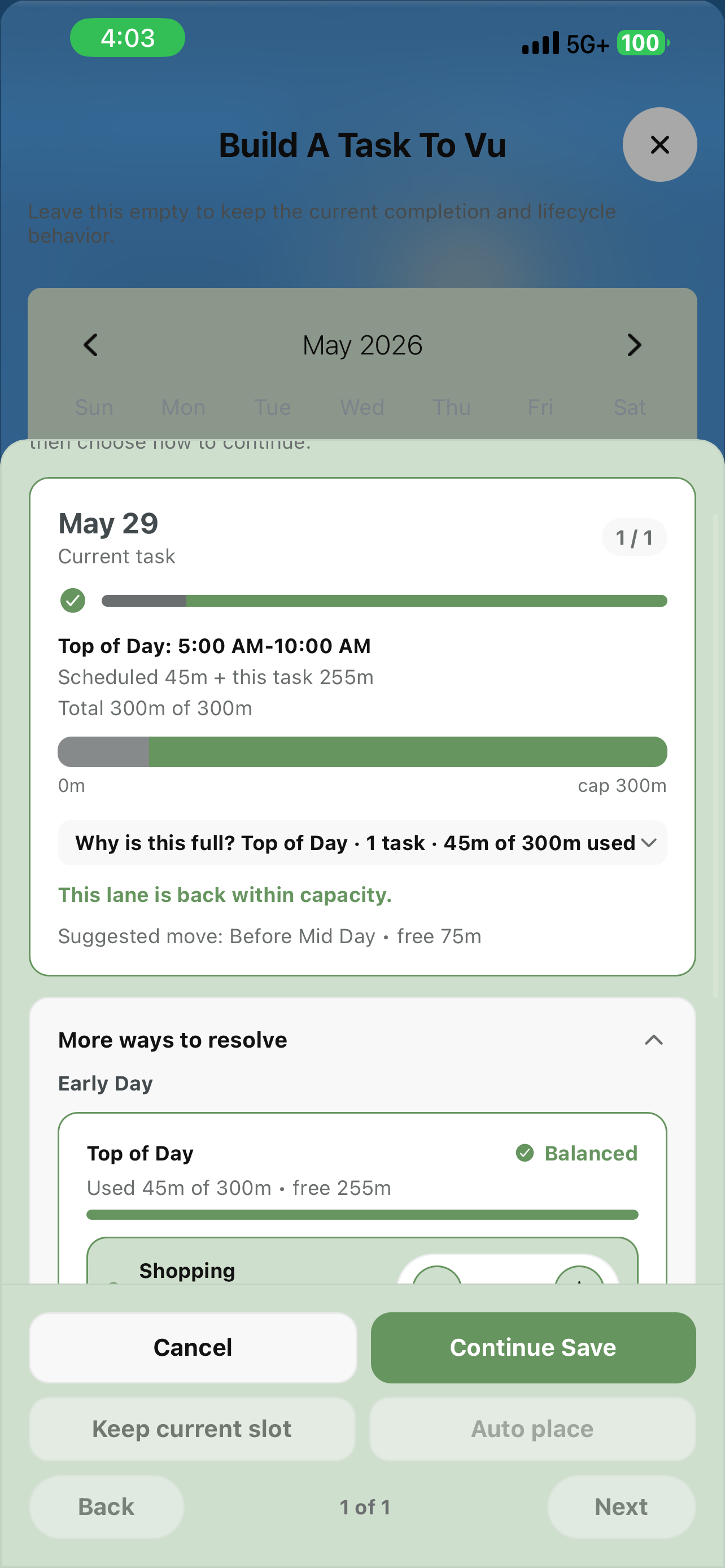
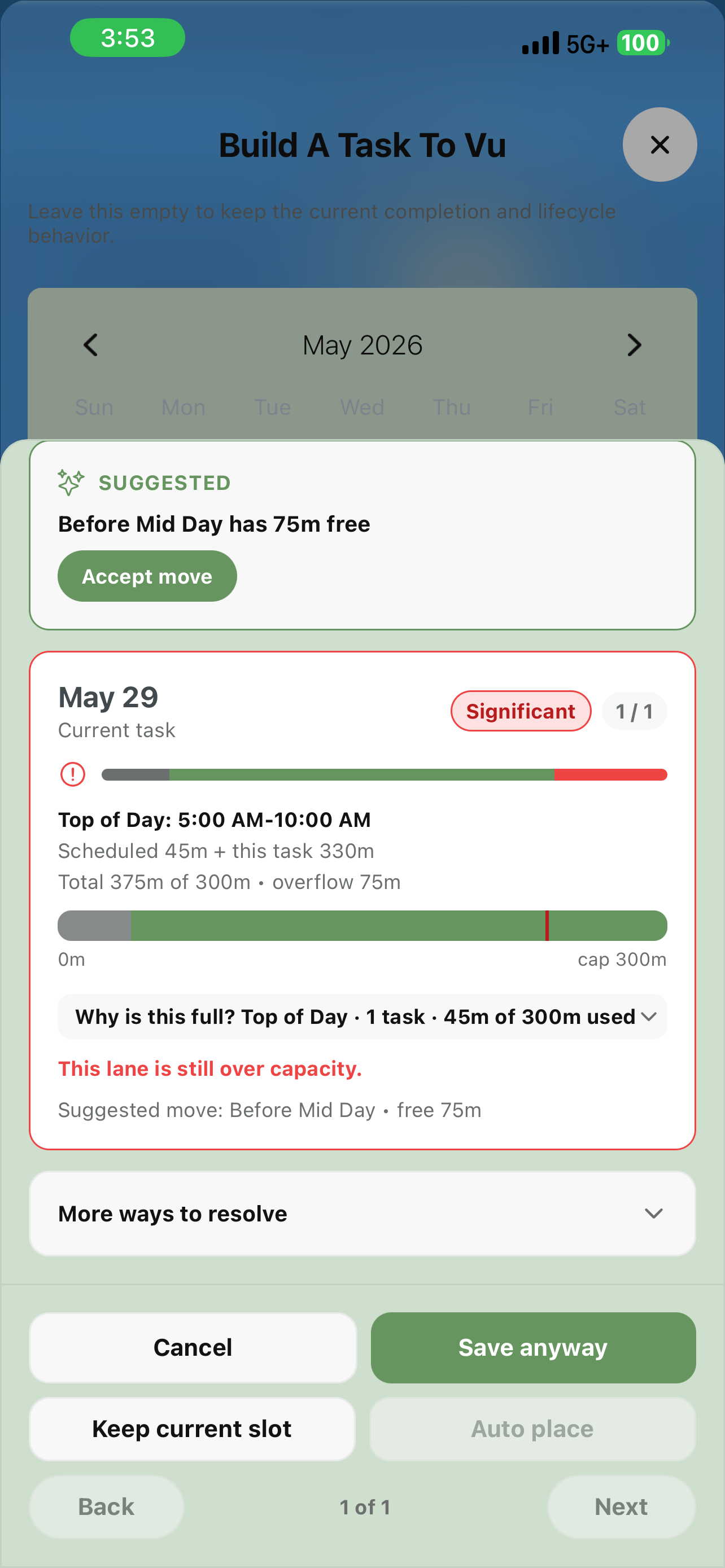
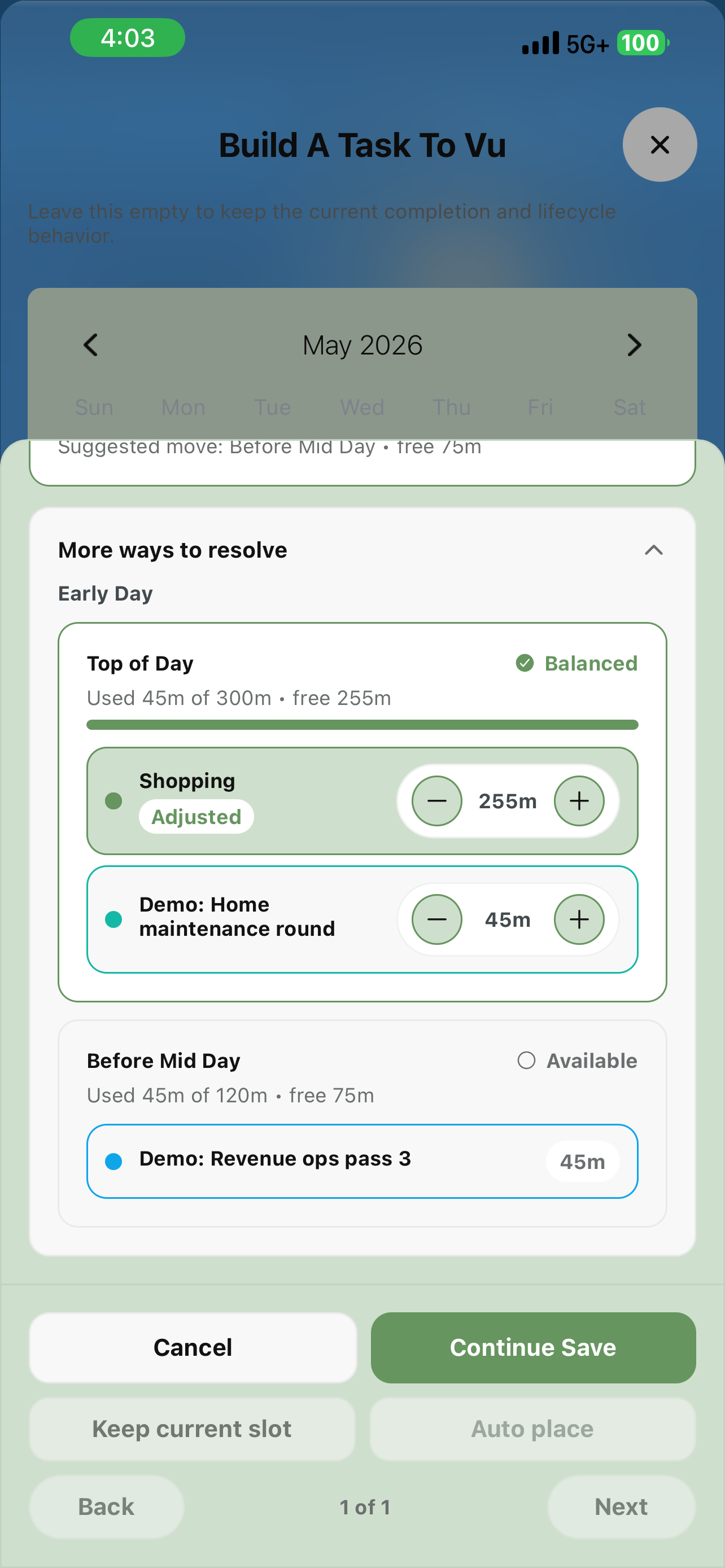
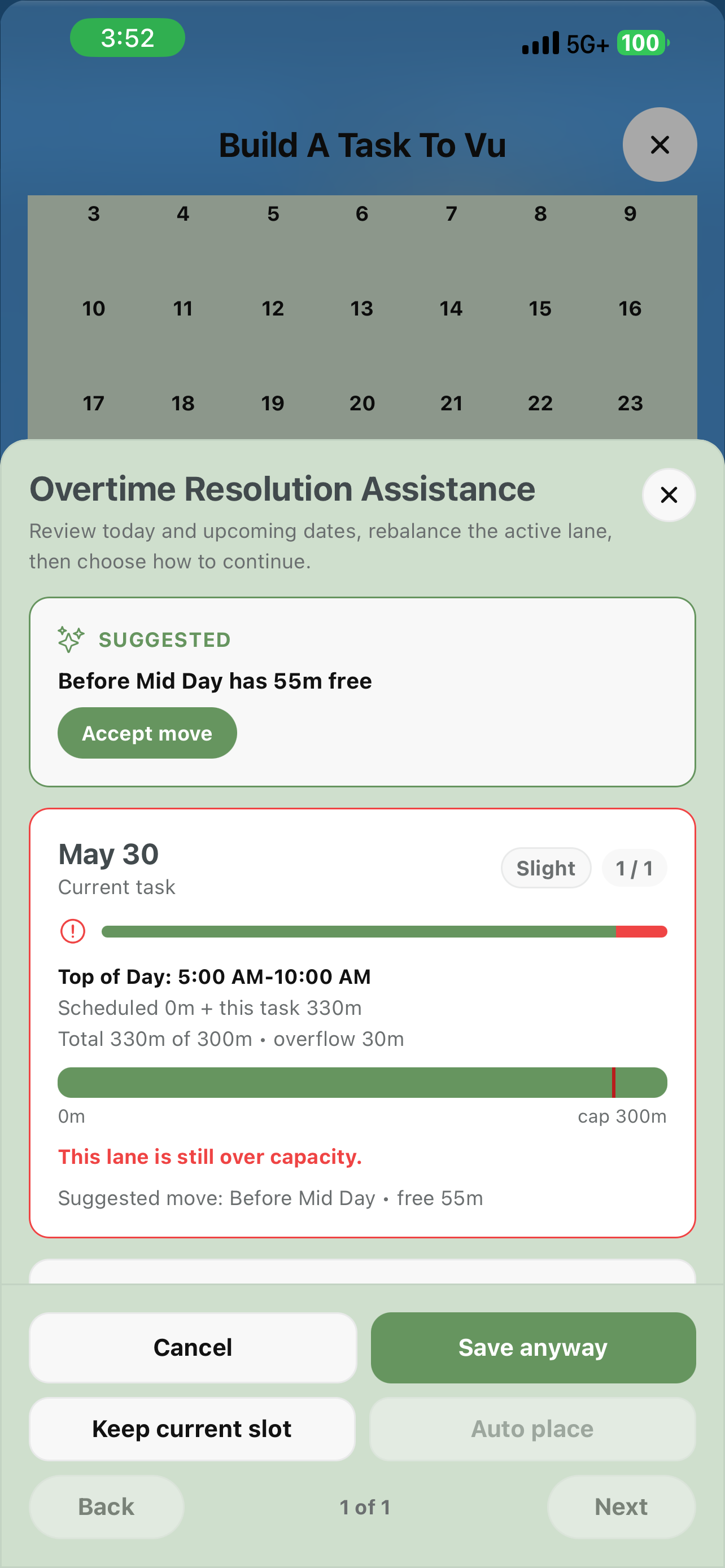
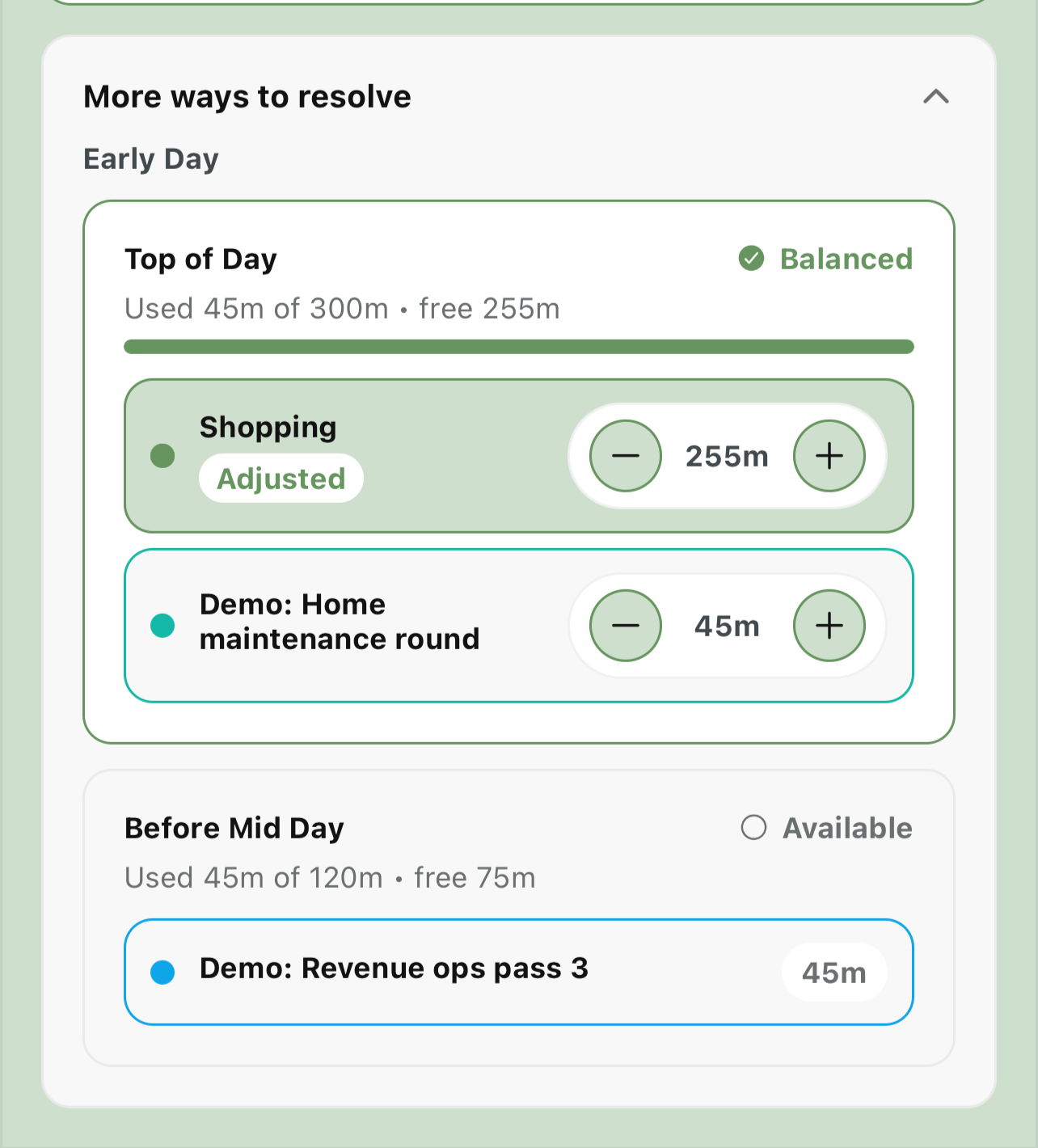
Free users always see when a lane is overloaded. Overtime Resolution lets you act on it in place: it intercepts the save and opens a rebalancing modal that calculates to the minute. A SUGGESTED card recommends the lightest open sub-block; “More ways to resolve” reveals per-task duration adjusters that update the capacity bar live. Auto place goes further — it quietly evaluates each overflowing lane before the modal even opens and resolves clean fits silently, never trimming a task or creating a new overflow.

Free: always-on overload warnings
Before

A warning chip, then you save anyway and figure it out later — or cancel and rearrange by hand.

With it

A rebalancing modal with exact minute math, a suggested fix, live adjusters, and Auto place.

In practice

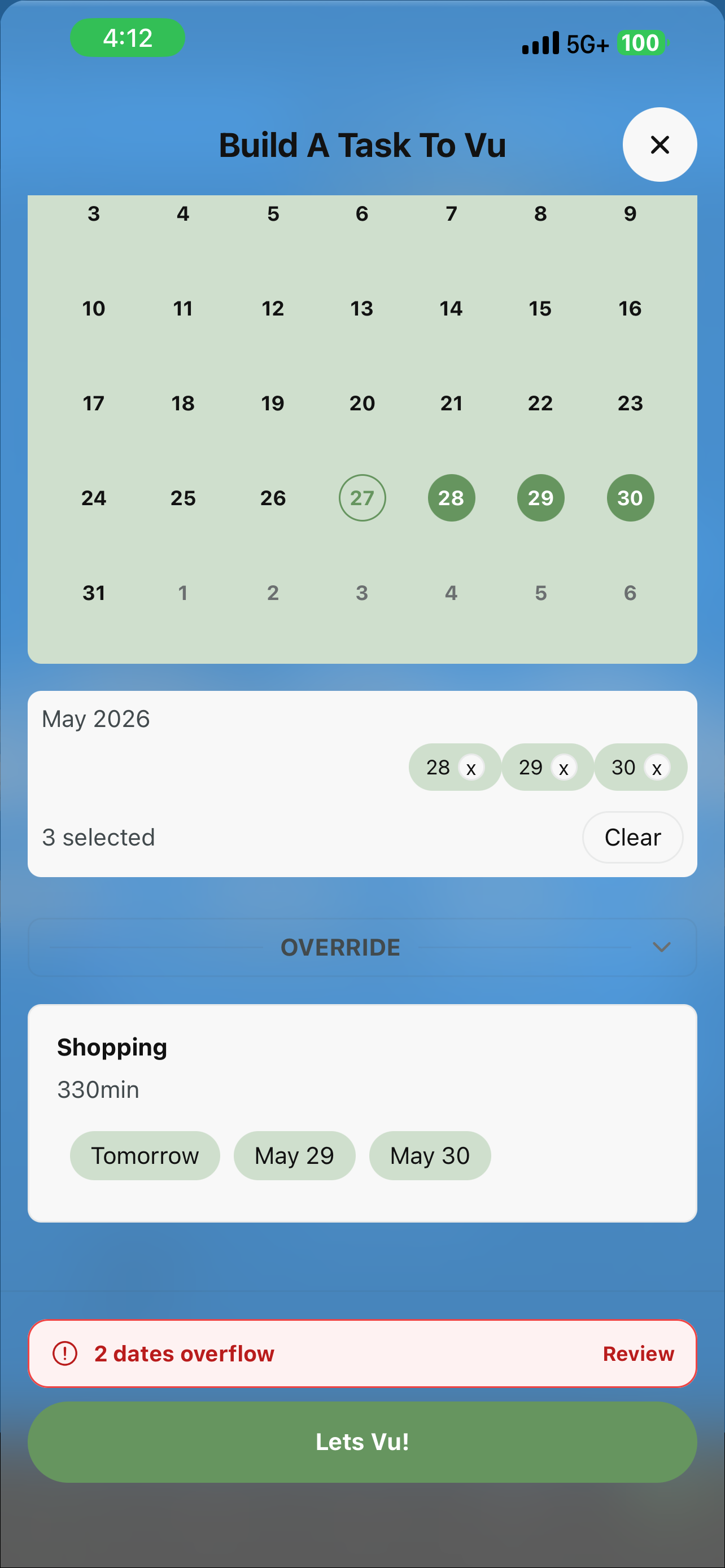
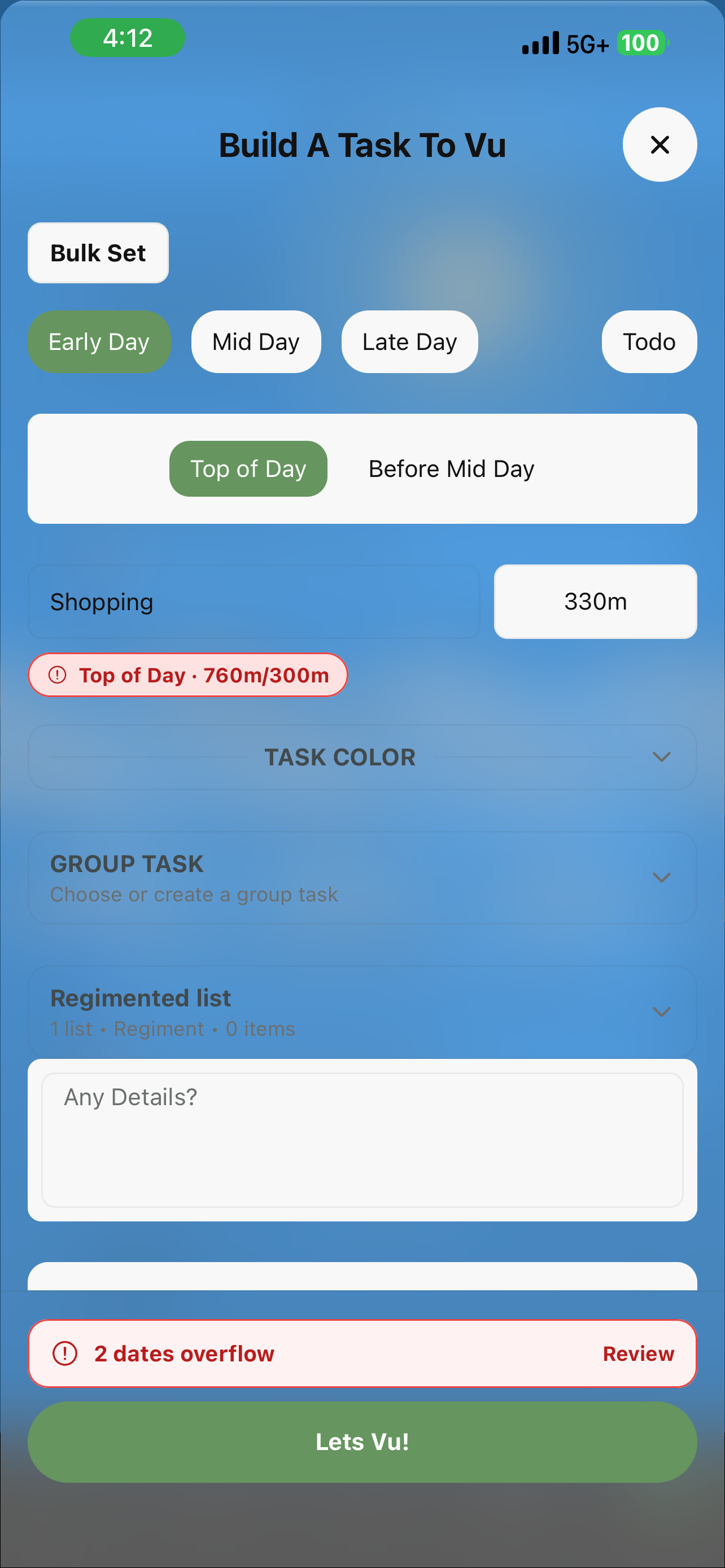
You schedule “Shopping” at 330m into Top of Day, which holds 300m and already has 45m. The modal opens: overflow 75m, “Significant.” It suggests Before Mid Day (75m free). Tap “Accept move” — or trim Shopping to 255m with the adjuster. The bar turns green. Continue Save.

ProVuProVu

Cycle

Close a run. Carry the work forward.

Some tasks repeat in bounded periods — a training block, a semester, a seasonal project. Cycle closes the current run, snapshots everything about it (dates, notes, files, regiments) into a permanent record, and resets the task into a new period — same identity, color, group, and mode. No new task is created; the cycle count just increments. Trigger it from a TaskHub card, an Inbox “Ready to cycle” notice, or the archive. The app never auto-cycles — you decide when a period ends.

Before

Archive, then rebuild from scratch. Lose the thread between periods.

With it

One action: snapshot the closed run, reset to new dates, keep the identity and history.

In practice

Your 8-week training program ends. You tap the cycle icon (showing “1”), adjust dates for weeks 9–16, and save — the badge ticks to “2,” and weeks 1–8 with all their progress freeze into a permanent snapshot.

Cycle · same task, new run
CYCLE 1 ✓
Weeks 1–8
16 dates frozen
CYCLE 2
Weeks 9–16
Active · same identity
The count ticks up. Nothing is duplicated.
ProVuProVu

Multi-Adjust

Batch actions. Staged precision.

Without it, reorganizing means one task at a time. Multi-Adjust lets you perform the same operation on many tasks at once from TaskHub — delete, archive, move to group, assign to bulk set, or remove. Enable it per bucket, select your tasks, and stage the action; queued operations show counter badges until you confirm. Every batch is atomic — all of them, or none.

Before

Select → act → repeat, for every task. Management friction blocks organization.

With it

Select many → one batch action → confirm. Staged counters, atomic execution.

In practice

End of the month: 12 completed tasks to archive and 5 to reassign to a new group. Two batch actions instead of seventeen individual edits.

Multi-Adjust — batch actions across many tasks
Stage delete / archive / move across many tasks · one atomic batch
ProVuProVu

Unlimited Tracking Modes

Intent on everything you run.

Tracking mode — Completion, Practice, or Guide — is the app's intent layer, and it's free to experience on up to 20 active tracked tasks at a time. ProVu lifts the cap so every task you run can carry intent, with no ceiling. Existing assignments are never stripped if you lapse; the cap only limits creating new ones beyond the free allowance. The mode you set still drives action labels, lifecycle, reminders, and how HistoryVu reads the work.

Free: up to 20 active tracked tasks
Before

Twenty active tracked tasks is plenty to feel the concept — but heavy users hit the ceiling.

With it

No ceiling. Tag intent on everything; the sensor feeds the reflection.

In practice

You lean hard on Practice and Guide across dozens of ongoing routines and stewardship tasks. Past 20 active, ProVu keeps every one of them tracked — and feeds a richer HistoryVu in return.

VuModal · intent
Complete · Completion — finishable work
Log · Practice — consistency
Follow through · Guide — stewardship
Free for 20 active · unlimited with ProVu
Coming soonProVu

Calendar Import

Your existing calendar, inside VuCalendar.

Calendar Import / Inbound Sync will pull events from your device calendar or Google, Outlook, and iCloud into VuCalendar's views — so you can plan your tasks around existing commitments without duplicating anything. The inbound counterpart to the free outbound export. In development.

Before

Check two apps to see your whole day.

With it

External events and VuCalendar tasks in one unified view.

In practice

Your work meetings from Google Calendar appear alongside your tasks in DayVu. Plan your productive windows around what’s already on the books.

Calendar Import
UI preview

Ready to add depth?

LocalVu features are yours permanently. ProVu unlocks everything while you're subscribed — and Set & Forget holds it all for years.

Set the sky

This page is a living sky — shift it however you like.